Value Added Courses

PHCET > Academics > Other Programs > Value Added Courses

Electrical Engineering

Introduction to PSpice and LTspice and Its Application
Course ContentCourse Summary
Topic Contents
Introduction to PSpice and LTspiceAn outline of Pspice, Types of Analysis in Pspice
Getting statring with PSpice and LTspiceDC simulation, PSpice Component Layout, DC Bias Simulation ,Linear Resistance ,Non-Linear Resistance Operating Point, Markers, Parametric DC Sweep Thévenin and Norton Equivalents
AC SimulationsAC Inputs, Time Domain (transient analysis), AC Sweep Analysis
Solar cell and Module simulation for STCSolar cell modelling and simulation analysis

Course Title

Introduction to PSpice and LTspice and Its Application

Course Outcome

  • Student can acquire experience in designing electronic circuits to perform real task
  • Student can understand what is PSPICE or LTSPICE and its use in industrial application
  • Student knows how to simulate a circuit using a PSPICE or LTSPICE simulator.
  • Student can demonstrate how to simulate an actual circuit using a PSPICE or LTSPICE in laboratory setting
  • Students can able to conduct circuit analysis using a PSPICE or LTSPICE circuit simulator
  • Student can able to apply acquire for various application

Class

BE/TE – Electrical Engineering

Duration

15 hrs

Course Fees

Free

Course Instructor

Ms. Asokan Selvaraj
aselvaraj@mes.ac.in

PCB Designing

Course ContentCourse Summary
Topic Contents
Overview of PCB DesigningDefinition and Need/Relevance of PCB, Background and History of PCB
Basics of PCB Designing: Types of PCB, Layering of PCBTypes of PCB, Classes of PCB Design, Terminology in PCB Design
PCB-CAD tools: DipTrace, Eagle, AltiumDifferent Electronic design automation (EDA) tools , Introduction to DipTrace, Eagle and Altium Environment, Latest Trends in Market
Electronic and Semiconductor Component package typesDifferent types of electronic components, Electronic components according to their size, power-ratings, package style and placements
Practical ImplementationSteps involved in fabrication of PCB. PCB Fabrication techniques-single, double sided and multilayer, Auto routing, Drilling, Etching: chemical principles and mechanisms, Post operations- stripping, black oxide coating and solder masking, PCB component assembly processes
Fundamental and real world projectDesign and fabricate PCB for any one project, mount the components, testing and troubleshooting methods

Course Title

PCB Designing

Course Outcome

  • Students can learn various types of PCBs. Schematic Design. entry Rules for Schematic Entry, Component Layout methods
  • Students can design and fabricate their own PCB for their Project

Class

BE/TE – Electrical Engineering

Duration

15 hrs

Course Fees

Free

Course Instructor

Ms. Supriya Sunil Shigwan
sshigwan@mes.ac.in

Ms. Ronita Pawn
ronita@mes.ac.in

Introduction to MATLAB and Its Application

Course ContentCourse Summary
Topic Contents
Starting with MATLAB Starting MATLAB, MATLAB windows
Working in the command window
Arithmetic operations with Scalars
Using MATLAB as a calculator
Creating Arrays Creating a one-dimensional array (vector), Creating a two-dimensional array (matrix) Addition and subtraction with arrays Array multiplication and array division
Applications in Numerical Analysis Numerical analysis
Solving an equation with one variable
finding a minimum or a maximum of a function examples of MATLAB applications
Applications in Control System Plotting bode plots using MATLAB plotting root locus using MATLAB
Applications in Power System and power Electronics Introduction to SIMULINK toolbox
Simpower system
Developing Simulation models of power system and Power electronics examples

Course Title

Introduction to MATLAB and Its Application

Course Outcome

  • To improve employability skills of engineering students
  • To bridge the skill gaps and make students industry ready.
  • Student can able to generate plots and export this for use in reports and presentations.
  • Student can able to program scripts and functions using the Matlab development environment.
  • Student can able to understand various toolboxes and their application in various domains
  • Student can able to model and simulate system to analysis its performance.

Class

BE/TE – Electrical Engineering

Duration

15 hrs

Course Fees

Free

Course Instructor

Ms. Lakshmi C R
crlakshmi@mes.ac.in
Ms. Pranita Chavan
pranitachavan@mes.ac.in
Information Technology

UIUX Jumpstarter Course
Course ContentCourse Summary
Topic Contents
Introduction to UX

  • Introduction to User Experience

  • Definition and concept Evolution of UX

  • UX around us Class activity UX Trends (Personalization, gestures, white interfaces.) Emerging Technologies AR VR AI IOT Misconception about UX

  • 6D process

The 6D UX Process

  • Introduction and Definition 6D process for a great User Experience

  • The 6D Steps explained Why use 6D?

  • Competitor Analysis Case Study Class Studio OLX , NETFLIX, DUNZO

Heuristic Evaluation

  • Introduction & Definition 10 Laws of Heuristic Evaluation

  • Case Study - Google pay Case Study - Uber Case Study - Gmail Class Studio

Introduction to Visual Design Tools 1

  • What is Photoshop? Examples of UI

  • What is Illustrator?

  • What are Vector Images What are Raster Images Difference between Vector & Raster Images Shapes and Images Icons/Graphics/Illustration Adobe XD

  • Overview Class Studio
User Research- 1&2

  • Definition and Concept Benefits of User Research

  • Elements of User Research

  • User Research Process

  • User Research Methodologies

  • User Interviews

  • Recap of User Research Class Studio

  • Research Execution Create User Interview Questionnaire Class activity

  • Conduct & observe user interviews

  • Analyse findings

  • Create a Persona & an Empathy Map Value proposition canvas - Introduction Create a Customer Journey

  • User Research Report Class Studio
Persona, Scenario & Storyboard

  • What are Personas?

  • How to create Personas Benefits of Persona (Who uses persona) Class Studio What is Scenario?

  • How to create Scenario Importance of Scenario

  • What is a Storyboard? How do we create Storyboard?

  • Importance of Storyboard Class Studio
Customer Journey Mapping

  • What is Customer Journey Mapping?

  • Benefits of Customer Journey Mapping

  • Components of a Customer Journey map

  • Mapping the right journey

  • Case study Class Studio
Task Flow Analysis

  • Introduction to Task Flow Hierarchical and Linear methods

  • Introduction to User Flow

  • Task Flow Vs User Flow

  • Example of Task Flow Analysis

  • Class Studio

Information Architecture

  • What is Information Architecture?

  • What are IA Patterns - L.A.T.C.H Open and Closed Card Sorting

  • Class Studio - Card Sorting Activity
Wireframing and Prototyping

  • What is a Wireframe?

  • Why should I use wireframes?

  • How to use wireframes

  • Different types of wireframes Digital & Non-Digital methods

  • Low & High-fidelity wireframes

  • Intro to UI design patterns Responsive Design Class studio: Make paper wireframes & digitalise them
Design Specifications & Assets

  • Definition and Concept Working on IOS and Android Iconography and Typography Working with specifications & assets

  • Atomic Design - Introduction Native apps Working with GUI kits

Portfolio Evaluation-

Course Title

UX JUMPSTARTER COURSE

Course Outcome

UX aims to provide a clear design and structure to the product, which guides the user throughout the journey of using the product and creates a sense of satisfaction on having completed a task at ease. UX is highly dynamic as it changes with every product. Each product has its own unique set of requirements.

Eligibility

All IT and Computer students

Duration

4 weeks

Course Fees

Free of cost

Course Instructor

Ms. Kajal Patel
kajalpatel@mes.ac.in

EXTC Engineering

Python for Data Science and Machine Learning
Course ContentCourse Summary
Topic Contents
Introduction to AI, ML and Data Science, PythonIntroduction to Data Science, AI and Machine learning and its applications, Examples of AI, Data Science applications in various
engineering disciplines
Introduction to Python, features of Python, Installation, Installing python Packages
Data TypesInteger, Float and Complex- Number Functions (Number Type Functions, Maths Functions, Random Number functions, Trigonometric Functions)
Operators in PythonArithmetic, Assignment, Comparison, Boolean values, Logical, identity, bitwise and membership operators, Shift operators
Data Structures: Lists, Tuples, DictionaryOperations on lists- Append, remove, slicing, insert, pop, reverse, len, count etc,
Operations on Tuples and Dictionary
Decision Flow Control Statementsif, if and else statement, Nested If, While, do and while, for, Continue, Break and pass etc
Functions and File HandlingDefining and calling the functions, return statements, Passing the arguments, Lambda Functions
Recursive functions, Modules and importing packages in python code
File Input/Output: Files I/O operations, Read/Write Operations, File Opening Modes, with keywords, moving within a file, Manipulating files
Numpy, Pandas, Matplotlib, Seaborn, Scipy Libraries:Introduction to Numpy, Creating and Printing Ndaray, Class and Attributes of Ndarray, Basic operation, Copy and view, Mathematical Functions of Numpy.
Introduction to Pandas, Understanding Dataframe, View and Select Data,
Missing Values, Data Operations, File read and write operation.
Introduction to Matplotlib library, Line properties, Plots and subplots, Types of Plots, Introduction to Seaborn.
Introduction to Scipy, Scipy Sub packages Integration and Optimization,
Eigen values and Eigen Vectors, Statistic, Weave and IO.
Graphical User Interface and Image processingGraphical User Interface using Tkinter Library module, creating simple GUI; Buttons, Labels, entry fields, widget attributes
DatabasesSqilite database connection, Create, Append, update, delete records from database using GUI. Basic Image Processing using OpenCV library, simple image manipulation using the image module
Machine Learning Algorithms:Supervised, Unsupervised, Reinforcement Learning, Case Studies, Deep Learning examples, Case Studies
Regression, Classification, Types of classifiersKNN, SVM, Decision Tree, Bayes etc, Case Studies

Course Title

Python for Data Science and Machine Learning

Course Outcome

After the successful completion of the course, students must be able to:

  • Learn about Python fundamentals, Python data structures, and working with data in Python
  • Become familiar with key Python functions, objects, and classes
  • Develop data science and ML applications using Python
  • Gain career skills in one of the world’s most popular programming languages

Eligibility

Any students with basic understanding of programming

Duration

Min 35 hours

Course Fees

Nil

Course Instructor

Dr. Mansi Subhedar
msubhedar@mes.ac.in
Ms. Pooja Shukre
pshukre@mes.ac.in

Mechanical and Automobile Engineering

Solidworks Mechanical Design – Associate Level Certification Course (CSWA)
Renewable Energy Sources

Course ContentCourse Summary
Topic Contents
Date and Time 27th July, 2024 to 10th October, 2024, 11.00 am to 01.00 pm
VenueSeminar Hall 3rd Floor Engineering
Resource PersonNikhil Thejesh V, Prime Minister's Research Fellow, Energy Science and Engineering, IIT Bombay
CoordinatorMs. Ashwini Kadam, Assistant Professor, Department of Mechanical Engineering, PHCET, Rasayani
DepartmentMechanical Engineering

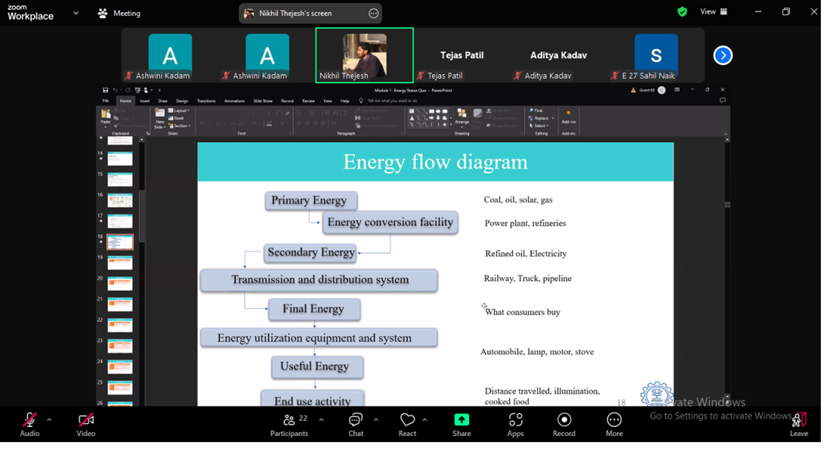
A 38-hour value-added course on “Renewable Energy Sources,” was conducted by Pillai HOC College of Engineering and Technology, Rasayani, in collaboration with the Prime Minister’s Research Fellowship (PMRF), Energy Science and Engineering, IIT Bombay. The course, held from 27th July 2024 to 10th Jan 2025, provided an in-depth understanding of the latest developments and technological advancements in the field of renewable energy.

Course Objectives

The course aimed to:

  • Equip participants with advanced knowledge of renewable energy technologies and their applications.
  • Provide insights into energy system architectures, energy economics, and policy frameworks.
  • Explore emerging trends in energy modeling, simulation, and technological integration.
  • Foster a deeper understanding of sustainability challenges in the context of global energy demands.

Learning Outcomes

Upon successful completion of the course, students gained:

  • A deep understanding of the current status and future projections for energy systems, especially the role of renewable energy.
  • Knowledge of energy system architectures and how to integrate renewable sources effectively.
  • Insights into the economic, environmental, and policy considerations that drive renewable energy adoption.
  • Practical skills in energy modeling and simulation techniques that optimize energy systems for efficiency and sustainability.

Conclusion

The course on “Advances in Renewable Energy Sources” has provided students with essential knowledge and skills to understand and contribute to the renewable energy sector. The insights gained will help students to apply innovative solutions in academic contexts.

Electronics and Computer Science Engineering

Linux Course

2024-25

Course ContentsCourse Summary

Topic Contents
System Architecture & Process Management
Theory TopicsLinux boot process (BIOS → GRUB → Kernel → systemd),Understanding runlevels / targets,Systemd & service management,Process lifecycle,Process states,Foreground vs Background jobs,Signals & kill commands (advanced usage),CPU & memory monitoring tools
Lab PracticeAnalyze boot targets,Manage services using systemctl,Monitor processes using top, htop, ps,Simulate zombie process,Change default target
User, Group & Permission Management (Advanced)
Theory TopicsAdvanced file permissions,Special permissions (SUID, SGID, Sticky Bit),ACL (Access Control Lists),User lifecycle management,Password policies,/etc/passwd, /etc/shadow, /etc/group,PAM (Pluggable Authentication Modules),sudo configuration
Lab PracticeConfigure ACLs,Implement password aging policies,Restrict sudo access,Create shared directories with controlled access,Test permission escalation scenarios
Disk & Storage Management
Theory TopicsDisk partitioning concepts,MBR vs GPT,LVM (Logical Volume Manager),Filesystem types (ext4, xfs),Mounting & fstab configuration,Swap management,Disk quotas,RAID (conceptual overview)
Lab PracticeCreate LVM volume,Extend logical volume,Configure persistent mounts,Set disk quota for user,Analyze disk usage (df, du advanced)
Shell Scripting & Automation
Theory TopicsAdvanced bash scripting,Variables & arguments,Conditional statements,Loops,Functions,Cron jobs & scheduling,Log rotation,Writing monitoring scripts,Exit codes
Lab PracticeWrite user creation automation script,Disk monitoring script,Cron-based backup script,Parse logs using shell scripting
System Security & Hardening
Theory TopicsSSH hardening,Key-based authentication,Firewall management (ufw / firewalld),SELinux / AppArmor basics,Fail2ban concept,Log analysis (/var/log),System auditing basics,File integrity monitoring
Lab PracticeConfigure SSH key authentication,Disable root login,Configure firewall rules,Analyze authentication logs,Implement basic hardening checklist
Containers, Virtualization & DevOps Basics (Optional Advanced Day)
Theory TopicsVirtualization overview,Docker architecture,Container vs VM,Installing & managing Docker,Creating custom Docker image,Docker networking basics,Introduction to CI/CD concept,Introduction to Git integration
Lab PracticeInstall Docker,Run container,Create Dockerfile,Deploy simple app in container,Monitor container logs

Course Title

Introduction to Linux

Course Outcomes

  • CO1: Apply Linux system architecture and process management concepts to monitor and manage system processes and services.
  • CO2: Implement user, group, and advanced permission management techniques to ensure secure multi-user system administration.
  • CO3: Analyze and administer Linux storage, automation, and security mechanisms using shell scripting, disk management tools, and basic containerization.

Eligibility

Any students with basic understanding of programming

Duration

Min 30 hours

Course Fees

Nil

Course Instructor

Mr. Jayesh Rane
jrane@mes.ac.in

2023-24

Course ContentsCourse Summary

  1. The Linux Foundation
  2. Linux Philosophy and Concepts
  3. Linux Basics and System Startup
  4. Graphical Interface
  5. System Configuration from the Graphical Interface
  6. Common Applications
  7. Command Line Operations
  8. Finding Linux Documentation
  9. Processes
  10. File Operations
  11. Text Editors
  12. User Environment
  13. Manipulating Text
  14. Network Operations
  15. The Bash Shell and bash Scripting
  16. More on Bash Shell Scripting
  17. Printing
  18. Local Security Principles

Course Title

Introduction to Linux

Course Outcome

  • CO1: Demonstrate basic knowledge of the Linux operating system, its philosophy, distributions, and system environment.
  • CO2: Perform common Linux command-line operations for file handling, text processing, and system navigation.
  • CO3: Apply basic Bash shell scripting and system utilities to automate simple tasks and manage processes in a Linux environment.

Eligibility

Any students with basic understanding of programming

Duration

Min 30 hours

Course Fees

Nil

Course Instructor

Ms. Pooja Shukre
pshukre@mes.ac.in

LaTeX for Academic and Research Writing

2024-25

Course ContentsCourse Summary

Topic Contents
Day 1 - Introduction to LaTeX & Document BasicsWhat is LaTeX? Why not MS Word?
Structure of a LaTeX document
Document classes (article, report, book)
Sections & formatting
Text formatting (bold, italic, spacing)
Lists (itemize, enumerate)
Special characters & symbols

Hands-on
Create a basic engineering report template
Format headings properly
Create structured notes
Day 2 – Mathematical Typesetting (Core for Engineers)Inline vs display math
Fractions, roots, superscripts, subscripts
Matrices
Align environment
Equation numbering
Referencing equations
Greek letters and engineering symbols

Hands-on
Write 10 common engineering equations
Create a derivation using align
Reference equations inside text
Day 3 – Figures, Tables & Cross ReferencingIncluding images (graphicx)
Figure positioning
Subfigures
Creating tables
Professional tables using booktabs
Table alignment
Captions and labels
Cross-referencing (figures, tables, sections)

Hands-on
Insert block diagram
Create result comparison table
Cross reference figures in text
Day 4 – Research Writing EssentialsBibTeX basics
Creating .bib file
Citing references
IEEE / APA style
Abstract writing in LaTeX
Keywords formatting
Writing multi-author paper
Footnotes

Hands-on
Create IEEE conference paper template
Add at least 10 references
Cite them properly
Day 5 – Advanced LaTeX for EngineersReport class structure
Chapters & TOC
List of figures & tables
Custom title page
Headers & footers
Page numbering styles
Code formatting (listings)
Algorithm environment
Multi-column formatting
Appendix

Hands-on
Create mini project report structure
Add code snippet
Generate TOC automatically
Day 6 – Beamer & Presentation DesignIntroduction to Beamer
Frame structure
Themes
Blocks
Mathematical slides
Including images
Overlays
Animations

Hands-on
Create 5-slide technical presentation
Include equation + image + bullet points
Add-onsTikZ for diagrams
Flowcharts
Circuit diagrams (for Electronics)
Resume building in LaTeX
Thesis formatting as per University guidelines
Using LaTeX with Git
Deliverables for StudentsBy end of SDP, each student should submit:
One mini research paper (IEEE format)
One technical project report template
One Beamer presentation
One resume in LaTeX
Evaluation PlanDaily assignment (30%)
Mini research paper (40%)
Final presentation (30%)

Course Title

LaTeX for Academic and Research Writing

Course Outcomes

  • CO1: Apply LaTeX commands to create well-structured documents including sections, tables, figures, and references.
  • CO2: Design and format academic documents such as reports, articles, and presentations using LaTeX templates and packages.
  • CO3: Compile and manage LaTeX projects by integrating bibliographies, mathematical equations, and cross-referencing features.

Eligibility

Any students with basic understanding of programming

Duration

5 Days

Course Instructor

Dr. Mansi Subhedar
msubhedar@mes.ac.in

Python Basics for Data Science

2023-24

Course ContentsCourse Summary

Module No.Content
Module 1Python Basics
Your first program
Types
Expressions and Variables
String Operations
Module 2Python Data Structures
Lists and Tuples Sets
Dictionaries
Module 3Python Programming Fundamentals
Conditions and Branching Loops
Functions
Objects and Classes
Module 4Working with Data in Python
Reading files with open
Writing files with open
Loading data with Pandas
Working with and Saving data with Pandas
Module 5Working with Numpy Arrays
Numpy 1d Arrays
Numpy 2d Arrays

Course Title

Python Basics for Data Science

Course Outcomes

  • CO1: Apply fundamental Python programming concepts such as variables, data types, control structures, and functions to develop basic programs.
  • CO2: Utilize Python libraries such as NumPy and Pandas to read, process, and manipulate datasets for basic data analysis tasks.
  • CO3: Develop and execute Python programs in Jupyter Notebook, including accessing data from files or web sources for simple data science applications.

Eligibility

Any students with basic understanding of programming

Duration

Min 30 hours

Course Fees

Nil

Course Instructor

Dr. Mansi Subhedar
msubhedar@mes.ac.in